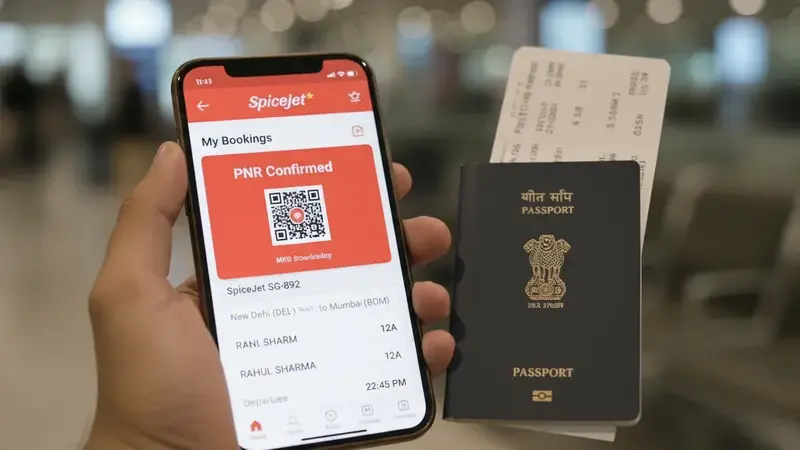
A dummy ticket starts looking fake when the document has mismatched fonts, uneven spacing, missing passenger fields, unclear PNR wording, impossible route timing, or manually edited ticket-number claims. The safest fix is not to “decorate” the PDF. It is to use clean, verifiable travel proof where the name, route, dates and booking reference make sense beside the visa form.
Your appointment is next week, and the staff may flip through your file in under a minute. The flight itinerary gets a quick glance. One font shift, one misaligned row, one cropped footer or one missing booking reference can turn that glance into a pause. The problem is not always the travel plan. Often, the problem is that the document looks assembled instead of issued.
This guide shows the common fake ticket mistakes that make visa travel proof look weak, even when your route and dates are reasonable. You will learn which visual cues create doubt, which fields must match the application exactly, which route details become risky when wrong, and how to run a fast audit before you upload, print or carry the itinerary to the appointment.
Key facts before submitting travel proof:
- Fake-looking documents usually fail because of consistency problems, not because the trip itself is impossible.
- Fonts, spacing, alignment, date formats and cropped edges are fast visual signals for reviewers.
- Name order, passport spelling, route, date rollover and booking reference must match the wider visa file.
- Do not invent ticket numbers, payment labels, baggage fields or airline identifiers to “complete” a reservation.
- A clean dummy ticket should be readable, current, verifiable and aligned with the application story.
- If a document already looks questionable, replacing it is usually safer than editing the PDF manually.
Need travel proof that does not look stitched together? Create a clean DummyFlights dummy ticket with readable fields, aligned dates and counter-friendly PDF presentation.
In This Guide
Official-source check: visa travel proof is judged as part of a wider consistency file, and false or misleading documents can create serious problems. European Commission Schengen guidance says supporting documents may show journey purpose, accommodation, financial means and intention to return. UK Visitor Rules can refuse applications involving false documents or false representations. Sources: European Commission Schengen visa guidance and UK Visitor Rules Appendix V.
Reviewed for: fake-ticket risk wording, dummy ticket claim safety, visual layout checks, PNR terminology, route-date consistency, visa-file field alignment, official-source caution and contextual-link rotation.
The Looks-Fake Problem: Font, Spacing and Layout Cues
At a visa counter, the itinerary often gets one of the fastest scans in the file. If the page feels edited, the reviewer may slow down before even reading the route. That pause is the problem. A document does not need to be dramatically fake to weaken confidence. It only needs to look inconsistent enough to invite a second look.
The visual layer matters because most booking outputs have system-like patterns. Airline, agency and reservation documents usually keep predictable spacing, repeated field labels, stable font weight and consistent alignment. When one part looks manually changed, the reviewer starts wondering what else was changed.
The font mismatch giveaway
A font mismatch is not about beauty. It is about mechanical consistency. For a UK Standard Visitor application, a France Schengen file, a Canada visitor upload or a Japan tourist visa packet, the itinerary should read like a normal system output. One font shift can look like a late edit, even when the travel dates are fine.
Look for these high-signal problems:
- Header and body use visibly different fonts without a normal template reason.
- The passenger name looks heavier, narrower or more squeezed than nearby text.
- One date line has different kerning from the rest of the itinerary.
- Random bold or italics appear where the template does not use emphasis.
- The booking reference looks pasted into a field that does not align with the label.
Before a visa appointment date, zoom the PDF to 125% and scroll from top to bottom. Your eyes catch font changes faster than most checklists. If the surname line looks different from the rest of the page, treat it as a warning sign.
Alignment and grid mistakes
Many flight summaries use a rigid grid. Route rows, flight numbers, times and terminal fields usually align because the document is generated from structured data. When columns drift, the itinerary can look like someone rebuilt the page by hand.
Common grid errors include:
- Departure and arrival times do not align vertically across segments.
- Flight number and carrier name sit on different baselines.
- Terminal fields shift left or right mid-page.
- Passenger details start in one column on page one and another column on page two.
- A logo or header appears stretched while the rest of the page is sharp.
Use a test that matches how the document may be reviewed on paper. Open print preview. If the table waves, the PDF may have been resized, pasted or exported poorly. A route with multiple connections already requires more attention; misaligned connection rows make the whole chain feel manually assembled.
Date and time formatting inconsistencies
Date clarity matters because short trips are evaluated for sequence and plausibility. If the itinerary mixes formats, the reviewer has to interpret instead of verify. That slows the file down and can create avoidable doubts.
Avoid these leaks:
- One segment shows 03/04/2026 while another shows 4 Apr 2026.
- Times switch between 24-hour format and AM/PM.
- A red-eye crosses midnight, but the arrival date does not advance clearly.
- One field uses local airport time while another appears to use UTC-style timing.
- Travel insurance, hotel check-in and flight arrival dates do not agree.
Ambiguous day-month formatting is a real risk for international files. If you can control the format, spelling the month is often safer than numeric-only dates. The less interpretation required, the stronger the document feels.
The screenshot trap
Many visa portals compress uploaded files. A screenshot that looked sharp on your phone can become fuzzy after export, and fuzzy booking lines look suspicious. The same problem happens when someone crops an itinerary to remove irrelevant details and accidentally removes the very fields a reviewer needs.
Screenshots often create four problems:
- Compression blur on small itinerary text.
- Cropped footers that hide references, status or provider details.
- Background tone shifts where pasted areas meet white space.
- Missing page context, making the document feel like a partial image rather than a booking.
Reopen the final exported file and zoom to 200%. If text breaks into blocks, replace the file before you submit. A clean PDF is usually stronger than a screenshot because the key fields stay stable and readable.
Myth: they only care that you have something
“Something” is not enough when the document creates more questions than answers. A manufactured-looking itinerary usually does not trigger a dramatic refusal by itself. More often, it creates a request for clarification, a request for updated documents, a slower counter discussion, or a weaker overall file.
For Schengen, UKVI, IRCC and similar files, get the visual layer right first. Then move to the data layer: missing fields, wrong identifiers, impossible timing and route details that do not behave like a real trip.
Missing Fields and Impossible Details Reviewers Cross-Check

After the layout looks credible, reviewers often shift to a faster test: do the details behave like a real booking for the trip you claimed? Small mismatches can create big doubts, even on an otherwise clean PDF.
Identity fields must match exactly
Visa forms are unforgiving about identity consistency because the itinerary sits beside your passport scan, application form, insurance, accommodation proof and financial evidence. If the name line changes between documents, the travel proof stops feeling automatic.
Match these items exactly:
- Name order and spacing, especially when the passport has multiple given names.
- Hyphens, apostrophes and compound surnames.
- Middle names, if they appear on the form or passport data page.
- Title or gender fields, if the itinerary includes them.
- Passport number only if the document normally contains it and the number is correct.
Be careful with “helpful edits.” Manually adding a passport number, title or missing middle name to a PDF can backfire if one digit is wrong or the font no longer matches the template. A clean replacement is safer than a patched document.
Booking reference, PNR and ticket number are not the same
A tourist visa file often includes a reservation summary, not a paid e-ticket. That difference matters because it affects what fields are normal to see. A reservation may show a booking reference or PNR without a full e-ticket number. A paid ticket may show a longer ticket number tied to issuance. An invoice may show an internal agency number that is not an airline identifier.
Keep the identifiers straight:
- Booking reference or PNR: usually short and used to retrieve the booking record.
- Ticket number: often longer and tied to paid ticket issuance.
- Invoice number: useful for agency records but not a substitute for airline booking data.
- Random strings: risky when presented as official airline identifiers.
If your PDF does not include a ticket number, do not invent one. A false ticket-number field can create a simple follow-up question you cannot answer: where did the issuance come from? If the document is a reservation, let it read like a reservation.
Flight structure logic must behave like a real route
Reviewers rarely calculate every aviation detail, but they do notice when a route reads like a puzzle. A strong itinerary should make chronological sense without forcing the officer to reconstruct the trip.
Check the trip as a chain:
- Date rollover: late-night departures and next-day arrivals must be clear.
- Connection realism: extremely tight international transfers can look implausible.
- Backtracking: unusual routing can be valid, but the travel plan should explain it.
- Airport codes: city names and airport codes should match the actual route.
- Entry point: Schengen or multi-country files should not conflict with main-destination logic.
Read the itinerary out loud as a timeline. If you catch yourself needing to explain the order, the reviewer may pause too. That does not mean the route is impossible. It means the supporting documents must make the logic visible.
Codeshares and partner airlines need clean labels
Codeshares are normal. The risk is not the codeshare itself. The risk is a document that mixes carrier identity in a way that looks stitched together. If one airline markets the flight and another operates it, the itinerary should show that relationship naturally.
Watch for these problems:
- A flight number belongs to one airline but the logo suggests another without an “operated by” line.
- Carrier names change style across segments without a normal reason.
- The header shows one airline while the route table uses another brand in a patched-looking way.
- The booking reference cannot be reconciled with the carrier shown on the document.
If your trip includes a partner-operated segment, let the document show it clearly. A clean “operated by” line reduces questions more than extra notes added manually.
Fare, baggage and payment labels can create risk
Some itineraries include fare class, baggage allowance, payment status and change rules. Some do not. Both can be normal depending on the document type. The danger appears when those fields are wrong, exaggerated or inconsistent with the reservation style.
High-risk entries include:
- “Paid” status on a document that is actually a temporary reservation.
- “Fully refundable” wording that conflicts with the provider or fare conditions.
- Odd baggage values that look like placeholders on long-haul segments.
- Seat assignments or boarding-pass-like details that do not belong at the visa stage.
- Fare amounts that contradict bank statements, sponsorship letters or budget logic.
If these fields appear, they should look natural. If they do not appear, do not add them. Over-completing a document is one of the easiest ways to make it look fake.
Field-level fake ticket checklist:
- Name, spacing and punctuation match the passport and form.
- Dates follow local time zones and date rollovers correctly.
- Route order matches the cover letter, hotel plan and appointment purpose.
- PNR or booking reference is visible and not mislabeled as a ticket number.
- Carrier and codeshare labels do not contradict flight numbers.
- No paid-ticket, baggage or refundability claim is added manually.
- Formatting stays consistent across all pages of the PDF.
A Safe Workflow to Avoid Fake-Looking Itineraries

The safest move is not “making it look better.” It is using a workflow that keeps flight information consistent, verifiable and easy to defend. Every manual adjustment increases the chance of a font shift, wrong identifier or date contradiction.
Decision tree: submit, replace or explain
Decide based on what an officer or counter agent can validate quickly against your visa application and passport details.
Submit when:
- The itinerary reads like a normal reservation or ticket-style document.
- The passenger name matches the passport exactly.
- The booking reference or PNR is present and consistently placed.
- The route and dates match the visa form, cover letter and accommodation plan.
- The PDF is clean, readable and not cropped.
Replace when:
- The file shows signs of copy-paste edits, mixed fonts or altered alignment.
- The reference line looks improvised or unverifiable.
- The document came from a random fake ticket generator with no real reservation structure.
- The date, route, carrier or passenger details contradict another document.
- You would need a long explanation before the itinerary makes sense.
Explain only when the underlying document is clean but a normal airline display creates ambiguity. A shortened name format, clear codeshare difference or schedule retiming can sometimes be handled with one factual sentence. Do not turn a simple clarification into a story.
Workflow that reduces mistakes
Start by locking the real travel logic before generating proof. Your intended travel dates should align with leave approval, hotel check-in, invitation letter, insurance coverage and appointment timing. If those documents are not aligned, even a beautiful itinerary can still fail the consistency test.
Use a source that produces genuine ticket-style formatting. A reliable dummy ticket for visa should not rely on a manually assembled airline screenshot. It should produce a clean document with fields that make sense for temporary travel proof.
Confirm identity fields before export. Name order, spacing and passport spelling are much easier to correct before the document is generated. After export, stop editing unless there is a genuine correction. PDF “quick fixes” create many of the exact visual problems this guide is warning about.
Run the final consistency check across the entire file. The itinerary should align with travel insurance dates, hotel or host details, cover-letter timeline, bank-statement logic and application dates. If your route implies a three-week trip but your supporting documents imply ten days, the itinerary cannot rescue the file by itself.
The two-minute visual audit
Use this fast scan before you upload or print:
- Zoom to 150% and check whether columns and line spacing stay consistent.
- Confirm the logo is not stretched, blurry or lower resolution than the text.
- Check that passenger name, route, dates and reference appear in normal places.
- Look for “too much detail” that feels manually added for persuasion.
- Reopen the exported file after compression and confirm small text remains readable.
- Print preview the PDF if you will submit a paper packet.
visa flight itinerary requirements explains the fields and booking-status labels to check. Correct discrepancies with the issuer rather than editing identifiers or copying airline branding into a fabricated file.
When a verifiable reservation service reduces risk
A verifiable reservation service is useful when you need travel proof quickly but do not want to buy final airfare before the visa path is clear. The goal is not to trick anyone. The goal is to present a clean, readable reservation that reflects a plausible route and date window.
DummyFlights can help when you need a dummy booking that is easier to read than a cropped screenshot or patched PDF. The document should show the core fields clearly, avoid invented identifiers, and give the reviewer or counter staff a simple path through the travel-proof layer.
For example, an applicant departing late at night from Delhi to Europe may have an arrival date that falls on the next calendar day. If the dummy ticket shows the departure date clearly but compresses the arrival line, the route can look impossible even when the flight itself is normal. Good formatting prevents that avoidable doubt.
If you already submitted a questionable itinerary
Treat the issue as document hygiene, not a debate. If the itinerary looks patched, replacing the file is usually safer than trying to repair one field inside a PDF editor.
Use this damage-control approach:
- Replace the document rather than patching font, date or PNR fields manually.
- Do not mislabel a reservation as a paid ticket if it is not paid.
- Keep any explanation short and factual, such as “updated reservation due to travel-date adjustment.”
- Do not submit multiple versions with conflicting dates unless the change is clearly explained.
- Avoid cheap fake-ticket sites that request sensitive passport details without clear handling.
If the officer requests updated proof, send only the corrected travel-proof document and the minimal explanation needed to connect it to the file. Extra narrative can create new contradictions.
High-Risk Exceptions and Random Checks

Some visa files receive routine handling. Others trigger a second look because the route, timing, airline relationship or document mix is harder to evaluate. These are the situations where fake ticket mistakes get exposed quickly.
Multi-city itineraries
Multi-city plans are common for Schengen holidays, Japan itineraries, longer UK visits and regional trips. They are also where small sequencing errors stand out. A multi-city itinerary fails credibility when the route stops matching the story in your application.
Before submitting, check:
- Segment order follows the same calendar flow as the cover letter.
- Each leg has a reason connected to hotels, meetings, tours or family plans.
- The first-entry point does not contradict the main-destination explanation.
- The return or onward segment aligns with the stated end date.
- Internal flights do not create impossible overnight or same-day timing.
If you are aiming for visa approval on a tight timeline, reduce complexity rather than adding extra movement to look “more planned.” A clean simple route is stronger than a busy route that needs defending.
Transit-heavy routes
Routes with multiple transits are normal for price and availability. The issue is that every transit creates another place where a reviewer can notice inconsistency. A long layover can look like a stopover. A self-transfer can imply a need to enter the transit country. A first landing city can affect Schengen logic.
Transit-heavy routes require clean sequencing:
- Departure and arrival dates should show local airport timing clearly.
- Layovers should look realistic for the airport and transfer type.
- Self-transfer routes should not pretend to be protected single-ticket connections.
- Insurance and hotel dates should not conflict with the arrival sequence.
- The final destination should match the visa application purpose.
If the route looks like a time puzzle, simplify the itinerary or make the supporting documents clearer. Reviewers should not need aviation expertise to understand the travel plan.
Codeshares, mergers and airline-name changes
Codeshares, partner airlines and airline-name changes can be legitimate, but they need clean labels. A wrong logo beside a flight number is one of the easiest ways to make a real route look assembled. This becomes more sensitive when the itinerary includes several carriers or partner-operated segments.
Use the natural airline display. Do not manually “correct” a partner segment unless the provider has issued a cleaner version. If the booking says “operated by,” keep that line visible. If the airline name changed after a merger, the document should use a consistent naming style rather than mixing old and new labels randomly.
Last-minute visa timelines
The fastest way to create a fake-looking file is to rush. Panic edits often introduce new contradictions:
- A new departure date no longer matches travel insurance coverage.
- A return date conflicts with approved leave or employer letters.
- A reshuffled route no longer matches the main destination.
- A new PDF uses different formatting from documents already uploaded.
- A “better” ticket number is added even though the booking was only a reservation.
Smart travelers reduce complexity under pressure. They keep the route clear, keep the dates aligned, avoid unnecessary additions and replace questionable proof with a clean document instead of editing the existing one.
Random checks at airline counters or embassy desks
Even strong documents can be checked. That is normal. A random check does not mean the itinerary is fake. It means the staff member wants to confirm that the route and reference make sense. This is where clean formatting and calm answers help.
If asked about the itinerary, answer from the document:
- “This is my intended travel date and route.”
- “The return/onward proof is shown here.”
- “The booking reference is listed on this line.”
- “The dates match my application and accommodation plan.”
Do not volunteer that the document was edited, temporary, disposable or “only for formality.” Those phrases make the proof sound weaker than it needs to be. The document should speak through its fields, not through an anxious explanation.
Your Final Fake-Ticket Mistake Scan
Before you submit a visa file or walk into an appointment, run one final scan. The itinerary should look like a normal travel-proof document and behave logically beside the rest of your evidence. If any part needs a long explanation, improve the document or simplify the route before submitting.
Final checks:
- The passenger name matches the passport exactly.
- The route matches the visa form, cover letter and hotel or host plan.
- The dates fit insurance, leave approval, appointment timing and stay limits.
- The booking reference or PNR is readable and not mislabeled.
- The PDF has no visible font, alignment, cropping or compression problems.
- The airline, codeshare and operating-carrier labels do not conflict.
- No invented payment, ticket-number or baggage claim appears.
- The file opens cleanly on your phone and prints clearly if needed.
A strong dummy ticket for visa complete guide strategy is not about adding more decoration. It is about making every visible detail easier to trust. When the document looks clean, the dates match, the route is believable and the reference is easy to find, your travel proof supports the file instead of distracting from it.
Want to avoid fake-looking ticket mistakes before your visa appointment? Create a clean DummyFlights document with consistent layout, readable fields and practical route-date logic.
FAQ
What are the most common fake ticket mistakes?
The most common mistakes are mismatched fonts, uneven alignment, missing passenger details, unclear booking references, invented ticket numbers, inconsistent date formats, impossible route timing and cropped screenshots that hide key fields.
Does a dummy ticket look fake?
A proper dummy ticket should not look fake. It should look like clean temporary travel proof with readable passenger, route, date and reference details. It starts looking fake when fields are manually edited, mislabeled or inconsistent.
Should I add a ticket number if my reservation does not show one?
No. Do not invent a ticket number. A reservation or hold may show a booking reference or PNR without a paid e-ticket number. Adding fake issuance details can create avoidable verification problems.
Can a screenshot be used as travel proof?
A screenshot can sometimes work, but it is weaker when it is cropped, blurry or missing reference details. A clean PDF itinerary is usually easier to read, print and upload without losing important fields.
What should I check before submitting a dummy ticket for visa?
Check passport name, date logic, route order, PNR or booking reference, carrier labels, PDF clarity, and consistency with the visa form, cover letter, hotel booking, insurance dates and travel purpose.
Is it risky to edit a ticket PDF manually?
Yes. Manual edits often create font shifts, spacing problems, wrong identifiers or date contradictions. If a document needs correction, replacing it with a clean version is usually safer than patching the PDF.
Can fake-looking travel proof hurt a visa application?
Yes. Fake-looking proof can lead to extra questions, requests for updated documents, delays or credibility concerns. False or misleading documents can create serious visa consequences depending on the country and situation.
What is the safest way to avoid fake ticket mistakes?
Use a clean, verifiable document source, confirm all passenger and route details before export, avoid manual edits, keep dates aligned with the wider file, and submit only the version that matches your real travel plan.
Friendly reminder: DummyFlights provides temporary travel-proof documents for planning and application support. Requirements vary by destination, airline, route and applicant situation. A dummy ticket can support a file, but it does not guarantee approval, boarding or entry.